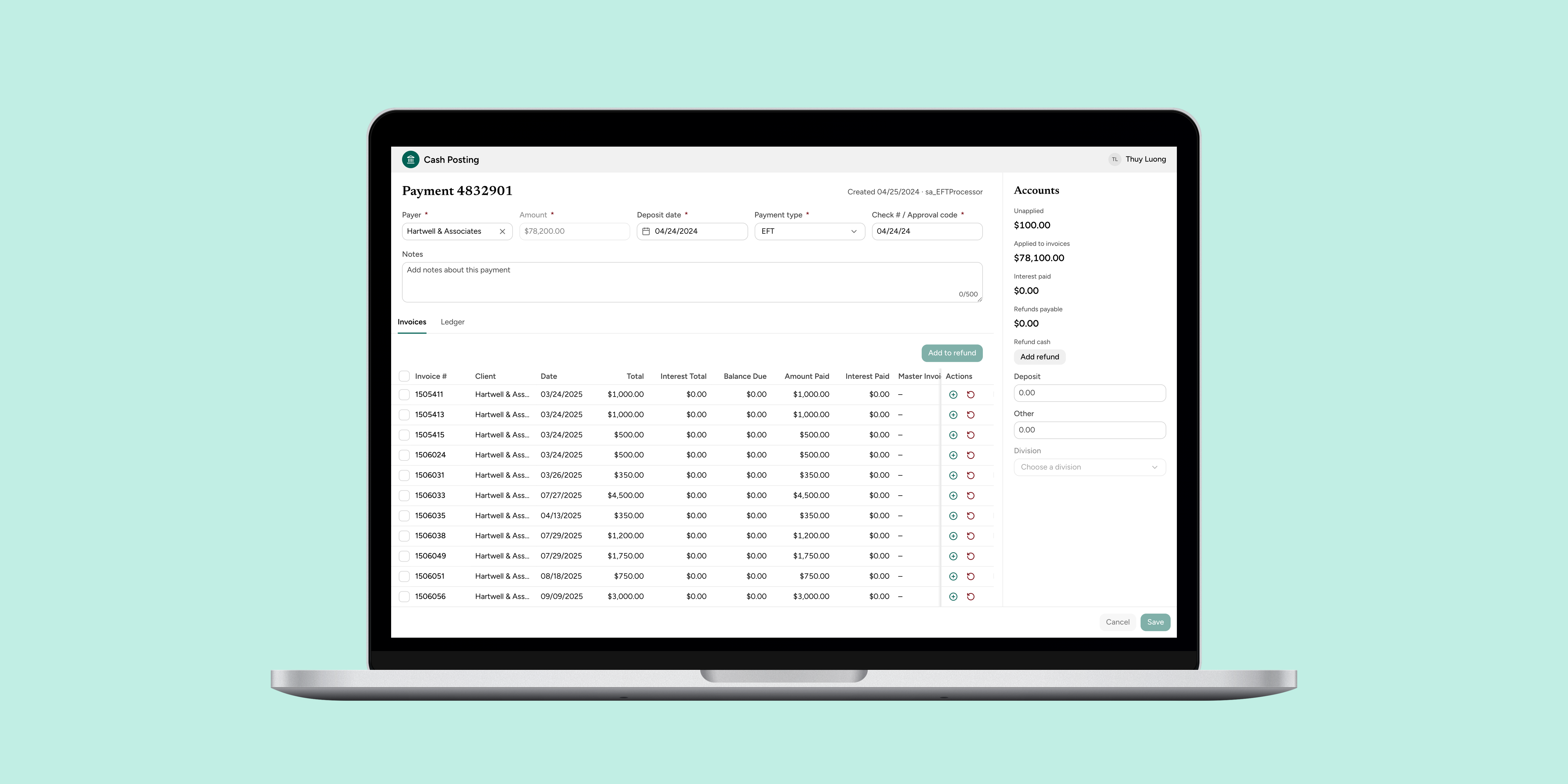
The Problem
The payment team at Company X had stitched together a method to review and process refunds using spreadsheets, external software, and email. The end-to-end process was cumbersome, slow, and confusing, and it relied on “tribal knowledge” that made training existing and new team members difficult.
The real cost was a backlog. Some delay was unavoidable: operations and bank policies meant every refund took at least 45 days. But the antiquated process worsened that delay, and by the time this project started, the payment team was about two months behind on refunds (~150 refunds in the backlog).
Refund lifecycle
Before
- 1
Log the refund
Representative
Pick the reason, move the cash, write invoice notes
Pain pointRefund details buried in a single notes field - 2
Approve
Director (+ Controller over $20k)
Run and clean up the Unapplied Cash report
Pain pointReport cleaned up by hand before every review - 3
Prepare paperwork
Representative → Director
Create cover sheets, log them, email them to AP
Pain pointOne manager's spreadsheet was a single point of failure - 4
Wait
No one: it sits in a queue
Then held for the next monthly AP refund review
- 5
AP approves and pays
AP team, AP manager, bank, Accounting
Two approvals, then the bank cuts and mails a check
Pain pointNo way to see when a refund was actually issued
After
- 1
Log the refund
Representative
Start from the payment and fill in one structured form
ResolvedDetails live in structured fields, not one notes field - 2
Approve
Director (+ Controller over $20k)
Read the refund's details, not a cleaned-up report
ResolvedReviewers read the refund itself, not a cleaned-up report - 3
Prepare paperwork
Folded into stage 1
The refund record replaces cover sheets, the spreadsheet log and emails to AP
- 4
Wait
No one: it sits in a queue
Then held for the next monthly AP refund review
- 5
AP approves and pays
AP team, AP manager, bank, Accounting
Details arrive complete. The bank cuts and mails a check
ResolvedRefund status reported in app
We couldn’t change the 45 days. We could remove the delay the process was adding. The team needed a simple, centralized refund processing solution that would reduce errors and cut training time.
Goals and Success Metrics
The overall objective was to clear the refund backlog and keep it from building back up, so refunds would go out as close to the 45-day policy floor as possible.
Primary metric
Fewer than 50 refunds in the backlog, month to month
Baseline: turnaround
~60–90 days from request to issue
Baseline: data entry
~30–45 minutes entering details per refund
Discovery
I worked with the product manager to run a focus group with the payment team to get a high-level understanding of the existing process and its points of friction. We then held 1:1 interviews with a select group of team members to understand the various use cases in depth.
1 focus group
With 4 payment team leads, to map the process and its friction
5 interviews
1:1 with team members of varying experience, for the use cases in depth
Who We Designed For
The finance organization involved several teams with different needs, because the payment lifecycle varied greatly from client to client.
Representatives start every refund. They pick the reason, move the cash and write up the details, then hand off to the manager. Newer team members lean on tribal knowledge and the manager's spreadsheet to get it right.
Needs from a refund
Which invoice, how much, and why
Goals
- Enter a refund once, in one place
- Get it right without waiting on the manager to check it
- Clear the backlog and keep it under 50 refunds a month
Frustrations
- Completing one refund takes four to five tools
- Refund details are buried in a single notes field
- Everything runs through one manager's spreadsheet
- No way to see where a refund stands once it's started
AP and accounting validate, approve and post refunds, then get the check from the bank to the client. They work from cover sheets the payment team emails over, reviewed in a monthly batch.
Needs from a refund
The refund total, and where it's going
Goals
- Receive complete refund details they can post without follow-up
- Know the total and the payee before paying out
Frustrations
- Cover sheets arrive by email and wait for a monthly review
- Missing details send a refund back to the start
- No shared record of a refund's history
Billers manage client invoices and the services behind them. When a refund changes what a client paid for, they need to know which services it touched.
Needs from a refund
Which services were impacted
Goals
- See which services a refund touches, so invoices stay accurate
- Find refund details without asking another team
Frustrations
- Refund context lives in another team's notes and spreadsheet
- Hears about refunds after the fact
What We Learned
- Too many touchpoints. Completing a single refund required four to five tools.
- No visibility into status. It was difficult to tell where a refund stood once it was initiated.
- Details were buried. Parsing refund details out of payment information was tedious and error-prone.
- A single point of failure. The spreadsheet was managed by one person, the manager. Team members relied on the manager to double-check their work. That pulled the manager away from other work and caused strain and confusion whenever the manager wasn’t around.
Getting Everyone on the Same Page
Different team members completed different steps of the process, so no one had the full picture, and people disagreed about how the whole process should work. After the interviews, I consolidated the findings into an end-to-end process flow and presented it back to the payment team.
Seeing the bigger picture helped the team understand each other’s work and helped us agree on next steps for the product. The finance leaders were surprised by just how tedious and manual the data entry was. The whole finance organization wanted a structured, standardized way of entering refund details.
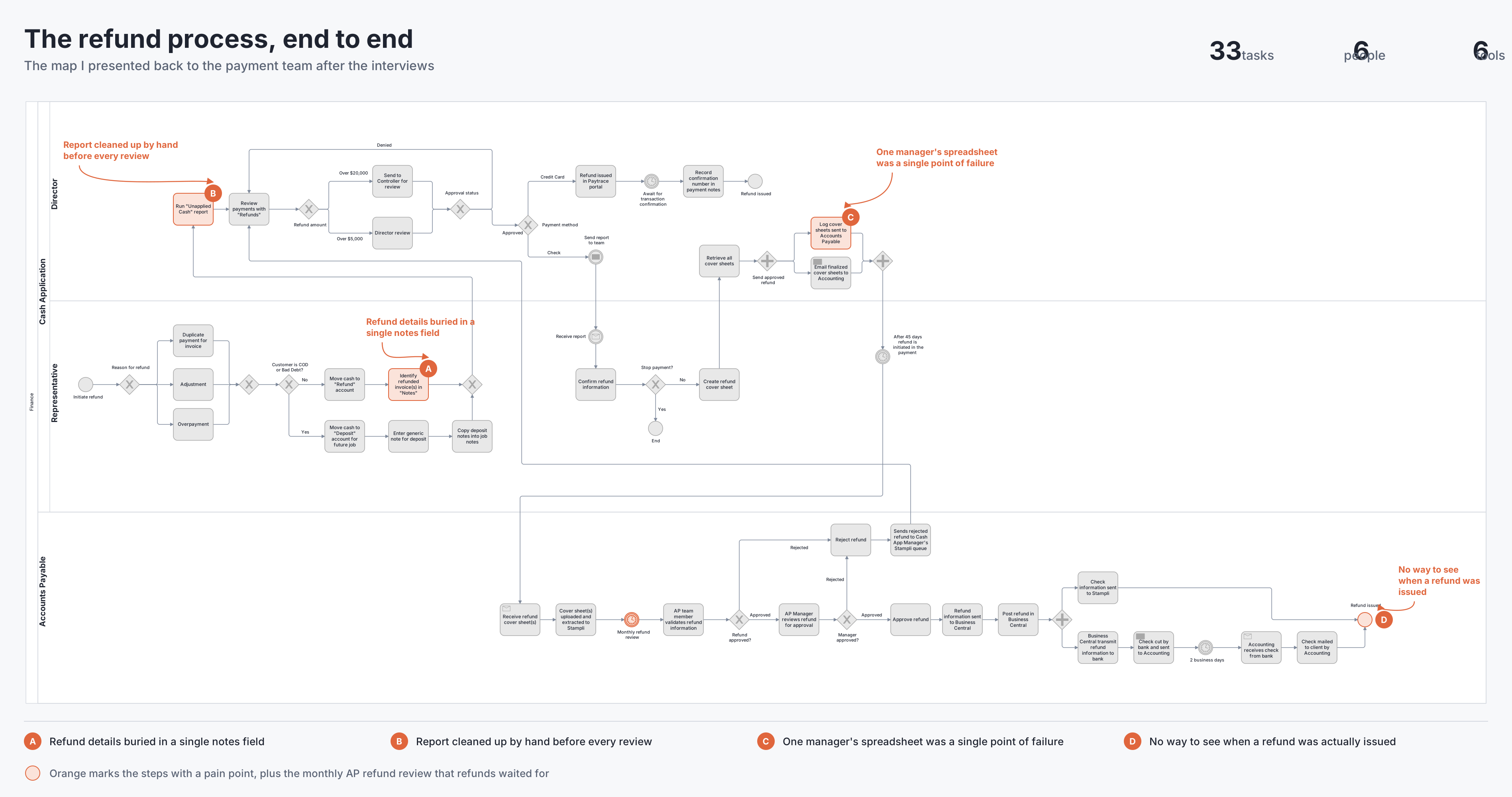
The as-is process: 33 tasks across the Director, Representative and Accounts Payable lanes
Approach
How might we centralize and provide transparency into the refund process?
Goal 1: One way to start a refund
Give the payment team one centralized way to initiate a refund
Goal 2: Easy updates
Make it easy to revisit and update refunds
Teams were combining spreadsheets and the application to hack together a way to initiate refunds. This introduced communication errors and made onboarding new team members awkward. And because the process was hacked together, updating an existing refund was cumbersome and ran through the manager’s spreadsheet.
Defining the Refund Data
With the goals in place, I defined the data needed to enter a refund. I worked with the product manager to map this to Company X’s operational requirements and the bank’s requirements. Understanding when each piece of data is entered and how it gets updated shaped how I designed the functionality.
Design Iterations
I wanted the payment team to be able to see a snapshot of the payment as a whole and then initiate the refund from it. Understanding how the payment was created and the transactions involved was critical for entering accurate refund information.
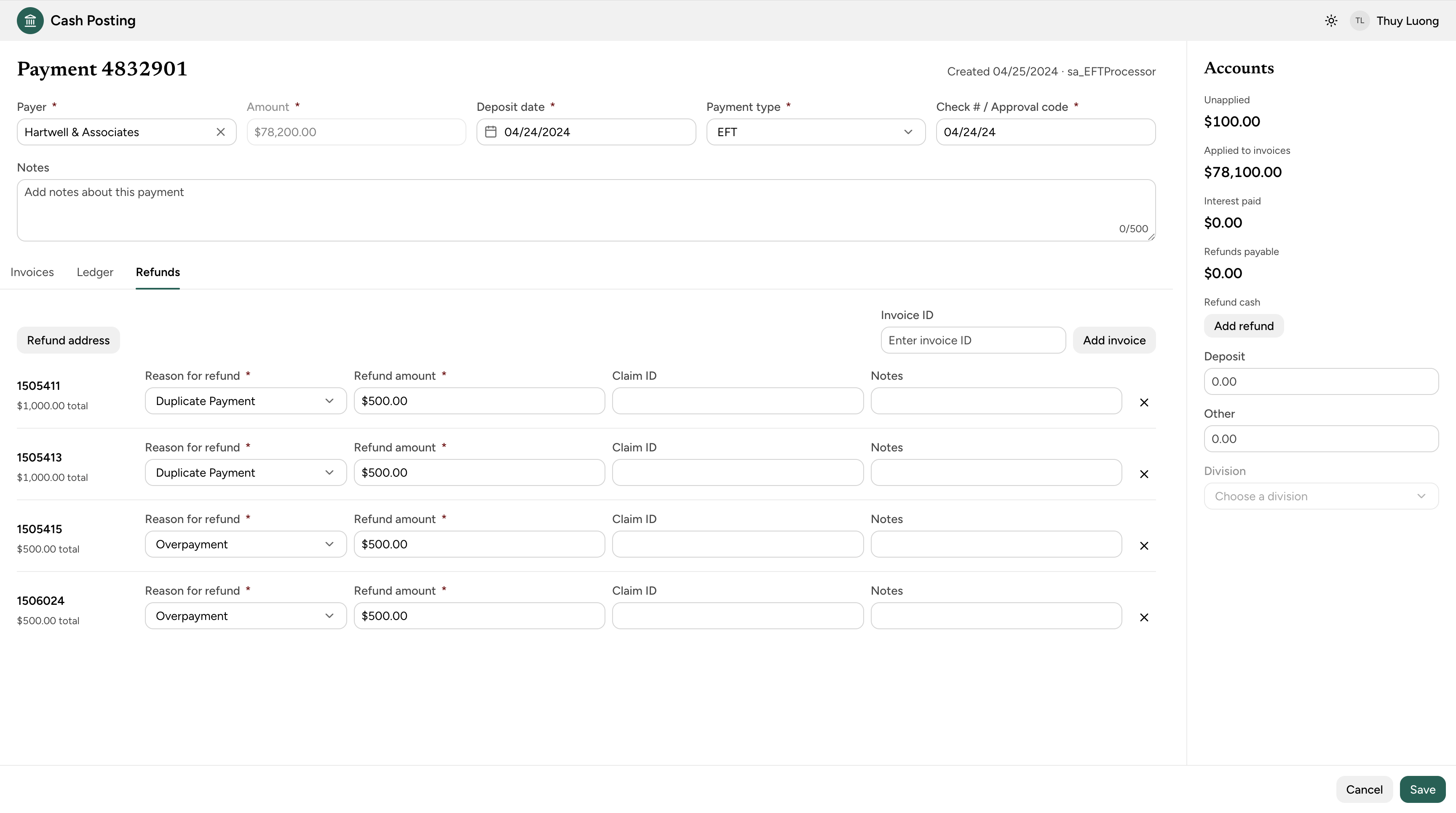
Iteration 1: refunds in a separate tab
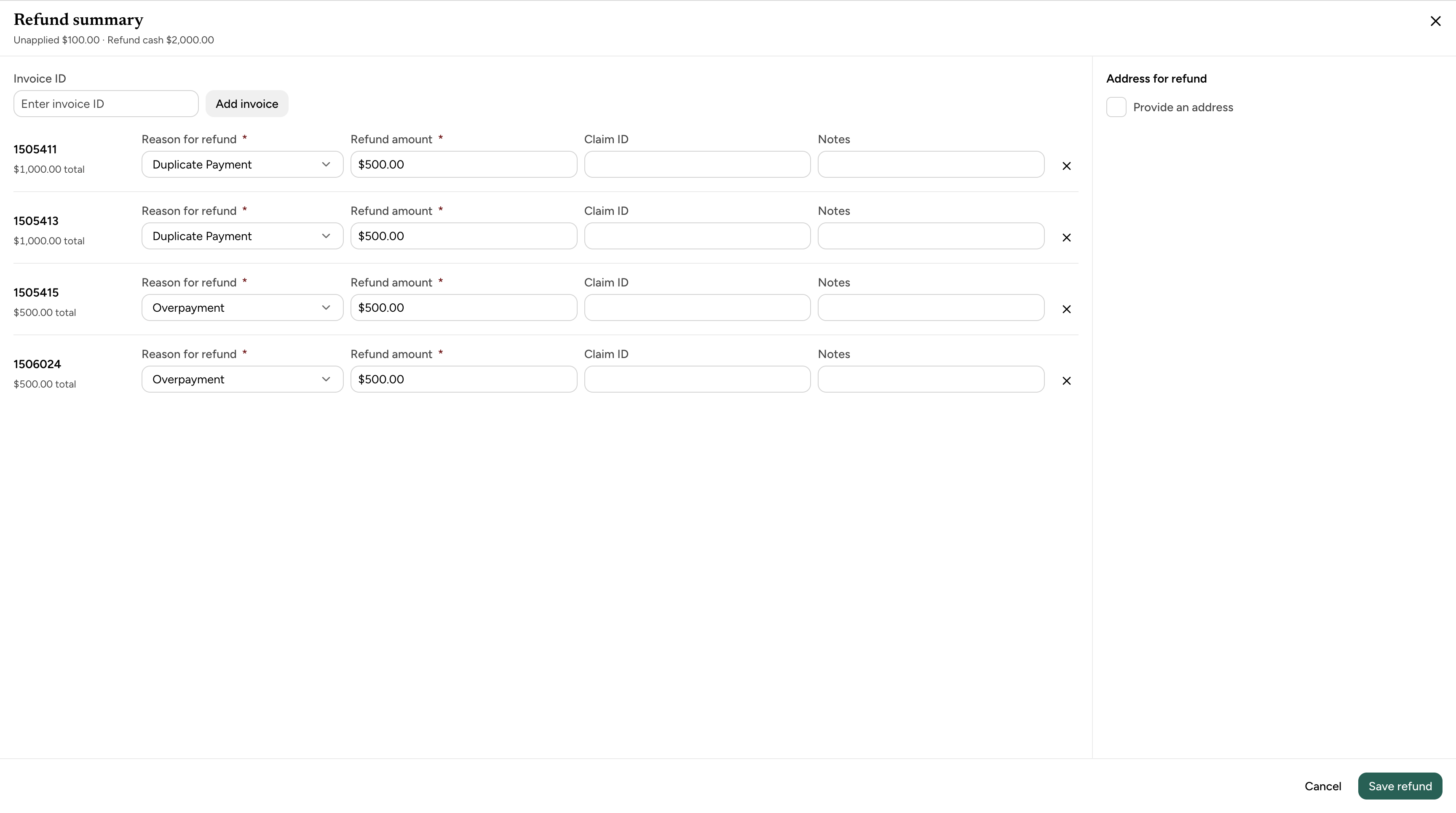
Iteration 2: refunds in a dialog
What we learned: The payment screen was focused on just that: the payment. Our research showed that users needed to focus solely on refund details to make sure they were accurate. Refund entry could also be long, especially for larger clients who made payments in bulk and needed bulk refunds. Mixing the two added noise.
Navigating Disagreement
The team disagreed on the two key points below. To work through this, I synthesized each team’s concerns at every step and used my early iteration as a concrete artifact to walk everyone through, which turned abstract debate into specific feedback.
1. What information was needed to complete a refund
Payment team
Which invoice, how much, and why
Accounting team
The total, and where it’s going
Billing team
Which services were impacted
One refund record holds every team’s fields: refund details for the payment team, payout for accounting, and impact for billing.
2. When that information needed to be entered
Teams generally disagreed about whether every detail had to be entered when the refund was initiated, or only before the details were sent to accounting.
- 1
Start the refund
Payment team
Required to create the refund
- Invoice
- Amount
- Reason
- 2
Complete the details
Payment team
Can be added or updated after the refund exists
- Payout details
- Impacted services
- 3
Send to accounting
Accounting team
Every field must be filled before it leaves the payment team
Constraints
We didn’t have the resources for formal usability testing. To compensate, I collaborated closely with the product manager and held frequent checkpoints with the payment team leads.
Given the opportunity to test, I would have run an A/B test of the design iterations, measuring time on task to complete a full refund.
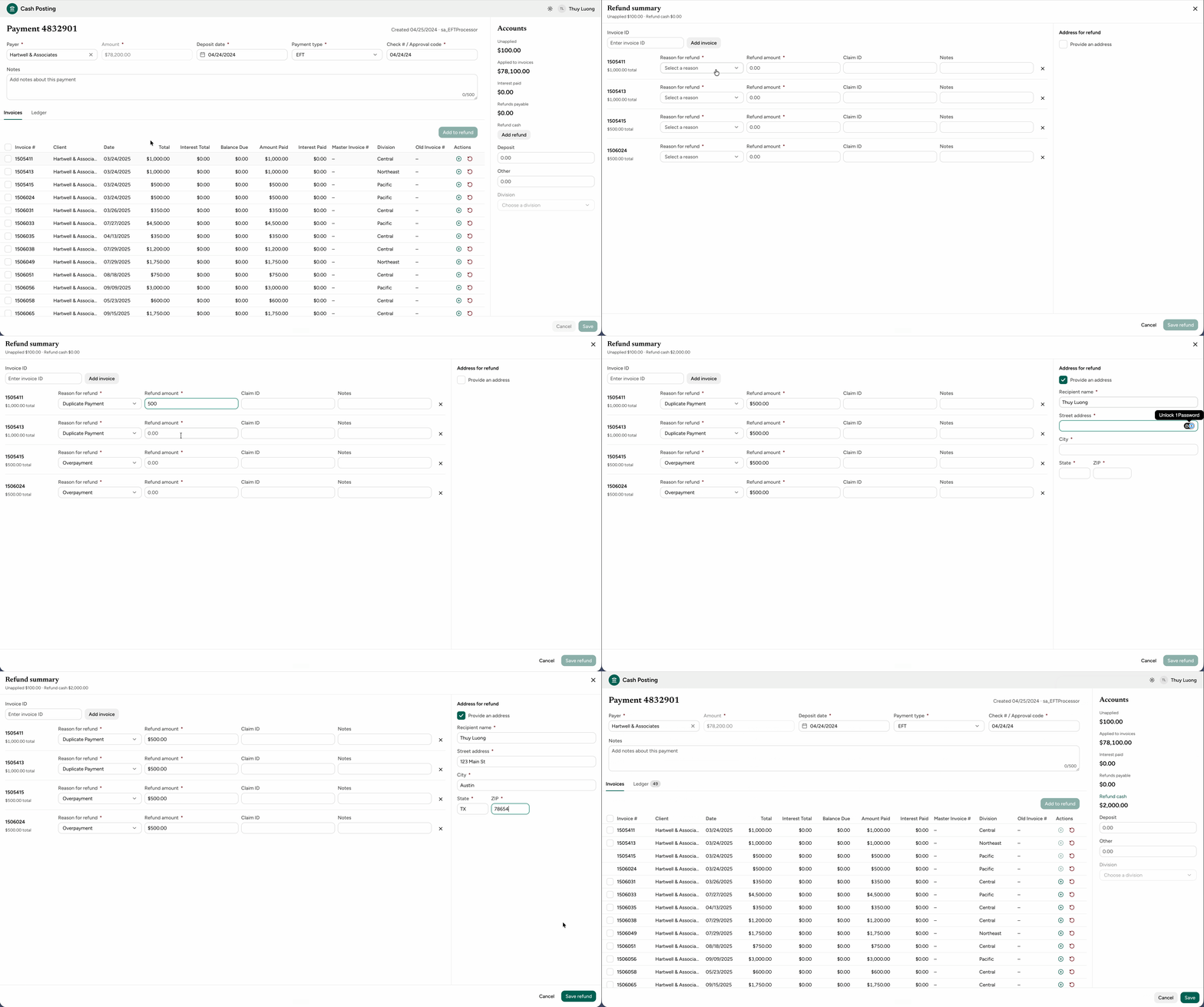
Final Designs
To view the prototype, click here.
Release Plan
We’re rolling out in phases so we can catch issues with the people best placed to spot them before a wider launch.
Phase 1: Team leads
Release, then gather feedback from the people who know the process best
Phase 2: Payment team
Release to everyone who starts refunds, then gather feedback
Phase 3: Billers
Release to the downstream team once the flow is stable
Outcomes
As the feature rolls out to the team, the product team will monitor the following metrics at 1, 3, and 6 months after release:
- Number of refunds in the backlog
- Number of refunds processed
What’s Next
As we release the first version of the refunds feature, I’m designing a refunds dashboard that shows every refund and its status. The goal is to fully centralize refunds in the payment application, eliminating extra apps and documentation so the application becomes the single source of truth for payments and refunds.